
SOAX Review.
SOAX sits in that interesting middle ground of the proxy market. It is not the cheapest tool you will find, and it is not trying to be a bargain-bin proxy seller either. It is built for users who care about clean IPs, strong location targeting, flexible rotation, and a dashboard that does not feel like it was designed in 2013.
That matters because proxy buying has changed. A few years ago, most buyers cared about one thing: “How many IPs do I get?” Now, serious users ask better questions. Are the IPs ethically sourced?
Can I target by country, city, ASN, or ISP? Can I hold a session long enough to complete a checkout flow or scrape a paginated marketplace? Can I use SOCKS5? Can I switch between residential, mobile, ISP, and datacenter without managing four separate accounts?
SOAX answers many of those questions well.
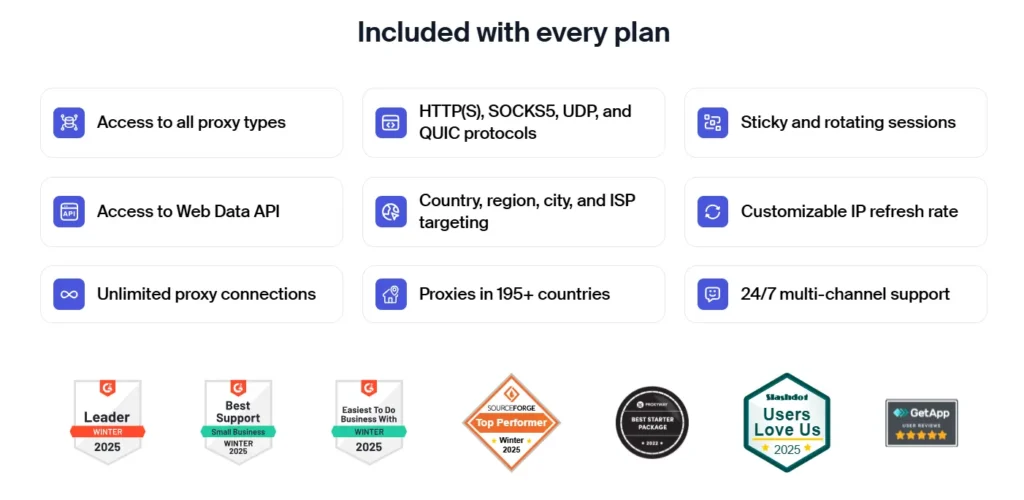
According to SOAX, its network includes 191 million plus IPs, with 155 million plus residential IPs, 33 million plus mobile IPs, and 2.6 million plus ISP proxies across 195 plus locations. It also supports HTTP, HTTPS, and SOCKS5, with flexible rotation options and a low-cost 3-day trial.
Quick SOAX Review Verdict
SOAX is best for businesses that need reliable residential or mobile proxies with detailed targeting and flexible session control. It is especially useful for web scraping, price monitoring, ad verification, SEO tracking, SERP collection, market research, and multi-location testing.
It is not the best choice if you only need ultra-cheap datacenter proxies or a basic proxy list for casual browsing. SOAX is more suitable for teams that want quality, targeting depth, and cleaner proxy infrastructure.
Best For
SOAX works well for:
- E-commerce price monitoring
- SERP scraping and SEO rank tracking
- Ad verification
- Travel fare monitoring
- Marketplace research
- Social platform testing
- Localized web data collection
- Sneaker, ticketing, and retail availability monitoring
- Data teams that need multiple proxy types under one platform
Not Ideal For
SOAX may not be the best fit for:
- Users who only want the lowest possible proxy cost
- Beginners who do not understand proxy types
- Tiny projects with very low monthly usage
- Users who need unlimited static private datacenter IPs only
What Is SOAX?

SOAX is a proxy and web data collection platform offering residential proxies, mobile proxies, ISP proxies, datacenter proxies, scraper APIs, and web data tools. Its main strength is clean proxy access with precise geo-targeting.
The platform positions itself around ethically sourced IPs, large global coverage, and flexible proxy configuration. SOAX states that users can access residential, mobile, ISP, and datacenter proxies through a unified subscription model, meaning the same data allowance can be used across multiple proxy products.
That is useful because proxy needs are rarely static. You may use residential proxies for marketplace scraping, mobile proxies for app testing, ISP proxies for account stability, and datacenter proxies for faster low-risk scraping. Managing all of that under one provider saves time.
SOAX Key Features
1. Large Residential Proxy Pool
SOAX claims access to 155 million plus residential IPs. These are real home-user IPs, which generally look more trustworthy than datacenter IPs because websites see them as normal consumer connections.
Residential proxies are useful when you are scraping websites that block cloud-hosted IPs quickly. This includes e-commerce sites, search engines, travel platforms, classified sites, and marketplaces.
Pro Tip: Use residential proxies when the target website is strict about bot detection. Datacenter proxies may be faster, but residential IPs usually give better success rates on sensitive targets.
2. Mobile Proxies for High-Trust Use Cases
SOAX also offers mobile proxies, with a claimed pool of 33 million plus mobile IPs. Mobile proxies use carrier network IPs, such as 3G, 4G, and 5G connections.
These are useful when platforms assign more trust to mobile traffic. Social platforms, mobile-first apps, and geo-sensitive services often treat mobile IPs differently from home broadband or datacenter traffic.
Mobile proxies are usually more expensive, but they can be worth it for difficult targets.
3. ISP Proxies for Stability
ISP proxies sit between residential and datacenter proxies. They are hosted like datacenter proxies but registered with real internet service providers. SOAX lists 2.6 million plus ISP proxies in its pool.
These are useful when you need a stable IP identity. For example, account management, ad account checks, dashboard access, and workflows where constant IP rotation creates suspicion.
4. Datacenter Proxies for Speed and Cost Control
SOAX also provides shared datacenter proxies. These are usually faster and cheaper than residential or mobile proxies, but they are easier for websites to detect. SOAX describes its datacenter proxies as a cost-effective option for scraping public data quickly.
Use them for lower-risk targets, internal QA, basic scraping, and high-volume tasks where success rate is not as fragile.
5. Flexible IP Rotation
SOAX gives users control over proxy rotation. According to its pricing FAQ, proxies can rotate on every request or at a custom interval. Residential and mobile proxies can hold sessions up to one hour, while datacenter and ISP proxies can hold sessions up to 24 hours.
This is one of SOAX’s better features. Some providers force aggressive rotation, which breaks logins, carts, sessions, and multi-step scraping flows. SOAX gives more practical control.
Pro Tip: For product listing pages, rotate per request. For login flows, checkout testing, account dashboards, or multi-page sessions, use sticky sessions.
SOAX Pricing Overview
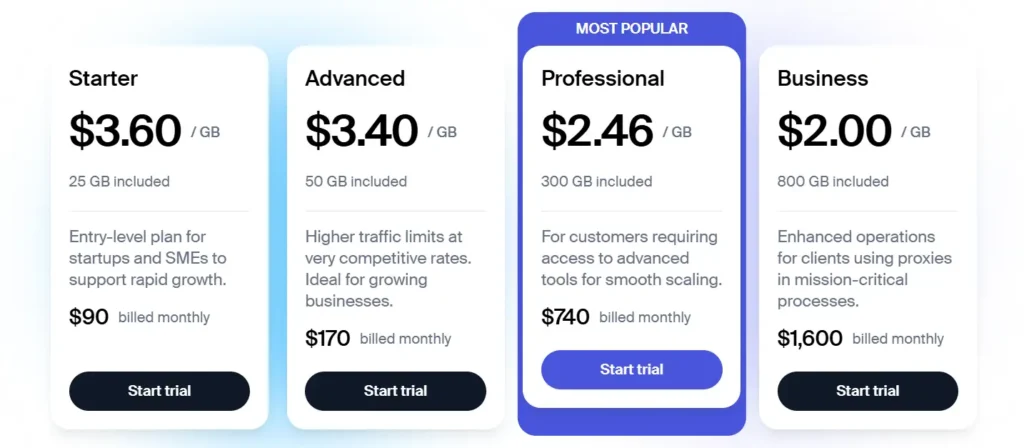
SOAX offers a trial with 400MB for 3 days at $1.99, based on its current pricing page. It also mentions access across residential, mobile, ISP, datacenter proxies, scraper APIs, and Web Data API under a unified subscription model.
Pricing can change, so always check the official pricing page before buying. As of the available SOAX pricing information, residential proxy pricing is commonly positioned from around a few dollars per GB depending on plan size. SOAX’s own blog mentions regular residential proxies around $5.50 per GB, with lower per-GB pricing available on larger plans.
SOAX Feature Comparison Table
| Feature | SOAX Offering | Why It Matters |
| Residential proxies | 155M plus IPs | Better trust for scraping and localized browsing |
| Mobile proxies | 33M plus IPs | Strong for social, app, and high-trust targets |
| ISP proxies | 2.6M plus IPs | Stable sessions with stronger trust than datacenter |
| Datacenter proxies | Available | Faster and cheaper for low-risk tasks |
| Locations | 195 plus | Useful for global market research |
| Protocols | HTTP, HTTPS, SOCKS5 | Flexible for scripts, browsers, and tools |
| Rotation | Per request or custom intervals | Helps balance success rate and session stability |
| Sticky sessions | Available | Important for carts, logins, and workflows |
| Trial | 3 days, 400MB for $1.99 | Low-risk testing before committing |
| Use cases | Scraping, SEO, ad verification, research | Suitable for professional data collection |
SOAX Pros and Cons
SOAX Pros
Strong proxy variety: SOAX gives access to residential, mobile, ISP, and datacenter proxies.
Large stated IP pool: The claimed 191 million plus IP pool is competitive in the proxy market.
Good geo-targeting: SOAX is strong for country-level and more granular targeting.
Flexible rotation: Users can rotate per request or maintain sessions for longer workflows.
SOCKS5 support: This helps users who need broader compatibility beyond standard HTTP and HTTPS.
Low-cost trial: The $1.99 trial makes testing easier before buying a bigger plan.
SOAX Cons
Not the cheapest provider: Budget users may find lower-cost options elsewhere.
Can be technical for beginners: Proxy rotation, ASN targeting, sticky sessions, and protocol choice require some learning.
Pricing needs checking before purchase: Proxy pricing changes often, so users should verify current plans.
May be more than casual users need: If you only need a basic browser proxy, SOAX may feel advanced.
SOAX vs Bright Data vs Oxylabs vs Decodo: Quick Comparison
| Provider | Best For | Proxy Types | Strength | Weakness |
| SOAX | Teams needing flexible targeting and rotation | Residential, mobile, ISP, datacenter | Strong geo-targeting and easy setup | Not the cheapest |
| Bright Data | Enterprise-grade web data operations | Residential, mobile, ISP, datacenter, scraping tools | Huge infrastructure and advanced tools | Can feel complex and costly |
| Oxylabs | Large businesses and data teams | Residential, mobile, ISP, datacenter, scraper APIs | Premium reliability and strong compliance focus | Higher entry cost |
| Decodo | SMBs and growing scraping teams | Residential, mobile, datacenter, ISP | User-friendly and affordable | Fewer enterprise controls than top-tier tools |
| NetNut | Stable ISP and residential proxy use | Residential, mobile, datacenter, ISP | Strong static residential setup | Interface feels less polished |
| IPRoyal | Budget-conscious buyers | Residential, datacenter, sneaker, mobile | Lower entry cost | Mixed performance on tougher targets |
| Rayobyte | Datacenter-heavy scraping | Datacenter, ISP, residential | Strong datacenter proxy reputation | Residential pool is less known than premium rivals |
How to Choose the Right SOAX Proxy Type
The best SOAX setup depends on what you are trying to do. Buying proxies without matching the proxy type to the job is where most people waste money.
Choose Residential Proxies for Scraping Tough Websites
Residential proxies are the safest default for web scraping. They work well when websites block datacenter IPs or show different content by location.
Use residential proxies for:
- E-commerce scraping
- Product price monitoring
- Search result tracking
- Travel fare tracking
- Classified ads research
- Competitor monitoring
Pro Tip: Start with rotating residential proxies for scraping public pages. Use sticky sessions only when the website expects a consistent visitor session.
Choose Mobile Proxies for Social, App, and High-Trust Tasks
Mobile proxies are expensive, but they often perform better on platforms where carrier IPs look more natural.
Use mobile proxies for:
- Mobile app testing
- Social media account checks
- Ad verification on mobile placements
- Region-based mobile content testing
- Harder anti-bot environments
Pro Tip: Do not use mobile proxies for every scraping job. They are powerful, but expensive. Save them for targets where residential proxies struggle.
Choose ISP Proxies for Account Stability
ISP proxies are best when you need a consistent IP that still looks more trustworthy than a normal datacenter address.
Use ISP proxies for:
- Account dashboards
- Long sessions
- Ad account checks
- Brand monitoring
- Marketplace seller research
- Repeated visits from the same IP
Pro Tip: For account-based workflows, avoid rotating too often. A stable ISP proxy can look more natural than jumping between residential IPs every few seconds.
Choose Datacenter Proxies for Speed
Datacenter proxies are best when cost and speed matter more than stealth.
Use datacenter proxies for:
- Low-risk scraping
- Internal testing
- Public pages with weak bot protection
- Fast data pulls
- Bulk URL checks
Pro Tip: Test datacenter proxies first on easy targets. If blocks appear quickly, move to residential instead of burning time tuning headers forever.
IP Pool Size: Why It Matters, But Not Alone
A large IP pool sounds impressive, but it is not the only thing that matters. Many buyers make the mistake of choosing the provider with the biggest number on the homepage.
You should also check:
- How often IPs repeat
- Whether the locations you need are actually available
- Whether city targeting works consistently
- Whether sessions stay stable
- Whether failed requests eat your budget
- Whether the provider supports the tools you use
SOAX’s large residential and mobile pools make it a strong option, but the real test is performance on your target websites.
Rotation Protocols Explained
Proxy rotation controls how often your IP changes. This is one of the most important settings in SOAX.
Per Request Rotation
Your IP changes on every request.
Best for:
- Scraping product pages
- Pulling search results
- Collecting public listings
- Avoiding repeated hits from the same IP
Bad for:
- Logins
- Carts
- Multi-step forms
- Anything requiring continuity
Sticky Sessions
Your IP stays the same for a set period.
Best for:
- Account access
- Checkout flows
- Form submissions
- Dashboard monitoring
- Multi-page browsing
Bad for:
- Huge scraping jobs where one IP sends too many requests
Custom Rotation Intervals
You choose when the IP changes.
Best for:
- Blended scraping workflows
- Marketplace monitoring
- Travel data collection
- SEO tracking tools
- Workflows that need both stability and scale
SOAX Setup Tips for Better Results
Match Proxy Type to Risk Level
Do not use mobile proxies for basic pages. Do not use datacenter proxies for heavily protected websites. Start with the cheapest proxy type that can complete the job reliably.
Use Country and City Targeting Carefully
Geo-targeting is useful, but narrower targeting may reduce available IPs. If you only need country-level data, avoid forcing city-level targeting unless it truly matters.
Watch Session Length
Long sessions help with continuity, but they also increase repeated activity from one IP. For scraping, shorter sessions usually work better. For account tasks, longer sessions are safer.
Test Before Scaling
Run a small test before buying a large plan. Check success rate, speed, block rate, captcha rate, and cost per successful request.
Who Should Use SOAX?
SOAX is a strong fit for users who need reliable proxy access without building a complicated enterprise stack.
It is especially good for:
- SEO agencies
- Web scraping teams
- E-commerce intelligence teams
- Market research companies
- Ad verification teams
- Affiliate marketers checking localized SERPs
- Developers building data pipelines
- Businesses testing regional content
It is less ideal for someone who just wants a cheap proxy for casual browsing.
SOAX FAQs
Is SOAX good for web scraping?
Yes. SOAX is a strong option for web scraping because it offers residential, mobile, ISP, and datacenter proxies with flexible rotation. Residential proxies are usually the best starting point for difficult websites.
Does SOAX support SOCKS5?
Yes, SOAX supports SOCKS5 along with HTTP and HTTPS. SOCKS5 is useful for tools and workflows that need broader protocol compatibility.
Is SOAX better than Bright Data?
SOAX is usually easier to approach for smaller teams, while Bright Data is stronger for enterprise-grade scraping infrastructure. If you want simplicity and strong targeting, SOAX is attractive. If you need large-scale web data tooling, Bright Data may fit better.
Is SOAX better than Oxylabs?
Oxylabs is often positioned as a premium enterprise provider, while SOAX feels more flexible for teams that want strong proxies without going fully enterprise. The better choice depends on your budget, scale, and support needs.
Can I use SOAX for SEO tracking?
Yes. SOAX works well for rank tracking, SERP scraping, local search checks, competitor research, and keyword monitoring across regions.
Can SOAX proxies be used for social media?
SOAX mobile and residential proxies can be used for social media testing, regional checks, and account access workflows. For account-based work, use stable sessions and avoid aggressive rotation.
Does SOAX offer a trial?
Yes. SOAX currently lists a 3-day trial with 400MB for $1.99, which is useful for testing performance before buying a larger plan.
Are residential proxies better than datacenter proxies?
Residential proxies are better for websites with stricter anti-bot systems. Datacenter proxies are faster and cheaper, but easier to detect. The best choice depends on your target site.
Is SOAX worth it?
SOAX is worth it if you need flexible targeting, multiple proxy types, and stronger control over IP rotation. It is not the cheapest provider, but it offers a good balance between usability, coverage, and professional-grade proxy features.
Final Verdict: Should You Buy SOAX?
SOAX is a solid proxy provider for serious users who need more than a basic IP list. Its biggest strengths are proxy variety, large stated IP pools, strong location targeting, SOCKS5 support, and flexible rotation.
For e-commerce scraping, SEO tracking, market research, ad verification, and localized testing, SOAX makes a lot of sense. It gives you enough control to tune sessions properly without forcing you into an overly complex enterprise setup.
The main drawback is price. If you are comparing only by cost per GB, SOAX may not always look like the cheapest option. But if your goal is better success rate, cleaner targeting, and fewer wasted hours, it is a provider worth testing.
My practical recommendation: start with the trial, test it against your real target websites, and measure cost per successful request. That number matters more than the advertised price per GB.