
Storm Proxies is not trying to be Bright Data, Oxylabs, or Smartproxy. That is both its biggest weakness and its biggest selling point.
This is a lean proxy provider built for users who want fast setup, unlimited bandwidth, simple pricing, and enough proxy power for small to mid-sized jobs without sitting through enterprise sales calls. Storm Proxies advertises residential backconnect rotating proxies and private dedicated proxies, with instant access after payment and a claimed network of 20+ million residential or premium dedicated proxies.
That sounds strong on paper, but the real question is simple: is Storm Proxies actually worth using in 2026, or is it too limited compared to newer proxy platforms?
My honest take: Storm Proxies is good for beginners, solo marketers, sneaker users, small SEO teams, and simple automation workloads. It is not the best choice for enterprise scraping, global geo-targeting, large-scale data collection, or advanced proxy orchestration.
Storm Proxies At a Glance
| Feature | Storm Proxies Review |
| Best For | Small scraping jobs, SEO tools, sneaker tasks, simple automation |
| Proxy Types | Rotating residential, backconnect rotating, private dedicated proxies |
| Claimed Pool | 20+ million residential or premium dedicated proxies |
| Bandwidth | Unlimited on many listed plans |
| Rotation | Per request, 3-minute, or 15-minute rotation depending on plan |
| Starting Price | Private dedicated proxies from around $10/month; rotating backconnect from around $39/month |
| Main Strength | Simple, cheap, beginner-friendly |
| Main Weakness | Limited controls, weaker geo-targeting, not enterprise-grade |
| Best Alternative | Smartproxy, IPRoyal, Webshare, Oxylabs, Bright Data |
What Is Storm Proxies?

Storm Proxies is a proxy provider focused on affordability and ease of use. Unlike enterprise proxy platforms that sell APIs, scraping browsers, Web Unlockers, datasets, and account managers, Storm Proxies keeps things basic.
You choose a proxy plan, pay, get access, and plug the proxies into your software.
That simplicity is useful if you are running tools like:
- SEO rank trackers
- Data scraping scripts
- Sneaker bots
- Ticketing research tools
- Ad verification tasks
- Social media automation tools
- Price monitoring bots
- Basic market research crawlers
The platform is especially attractive for users who hate bandwidth-based billing. Many modern residential proxy providers charge per GB, which can become expensive if your scripts are poorly optimized. Storm Proxies leans more toward port/thread-based plans with unlimited bandwidth, which makes costs easier to predict.
Storm Proxies Pricing Review
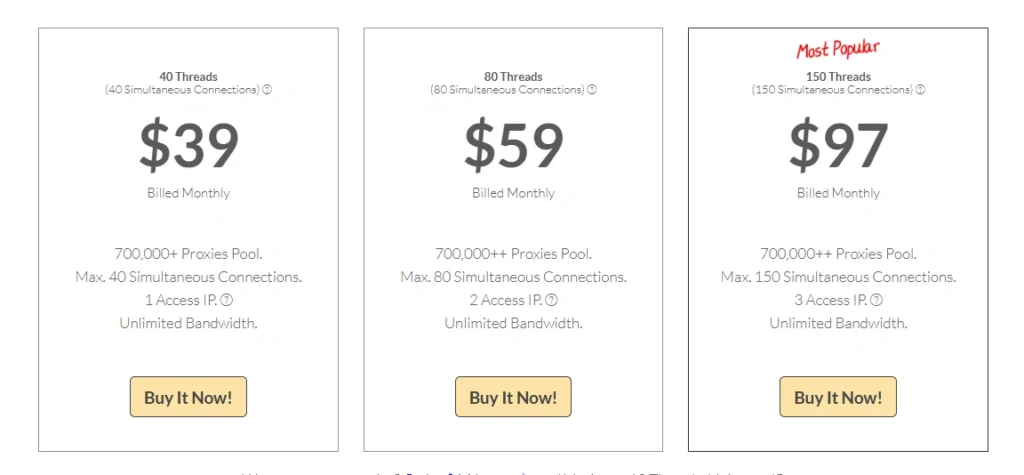
Storm Proxies is known for low entry pricing. Its private dedicated proxy page lists 5 private proxies at $10/month, with unlimited bandwidth, 100 concurrent threads, multiple subnets, and 3 USA locations covered.
Third-party pricing summaries also show Storm Proxies’ backconnect rotating proxies starting around $39/month and residential rotating plans around $50/month, although users should always verify pricing on the official site before buying because proxy pricing changes often.
| Plan Type | Typical Starting Price | Best For |
| Private Dedicated Proxies | Around $10/month | Static IP use, SEO tools, account management |
| Backconnect Rotating Proxies | Around $39/month | Scraping, automation, rotating sessions |
| Residential Rotating Proxies | Around $50/month | Lower-block-rate tasks, marketplace research |
| Sneaker Residential Proxies | Higher-tier pricing | Sneaker bots, release monitoring |
Pro Tip
Do not choose Storm Proxies only because it says “unlimited bandwidth.” Unlimited traffic is useful, but IP quality, rotation behavior, target-site success rate, and ban resistance matter more for serious scraping.
Storm Proxies Pros and Cons
Pros
1. Very beginner-friendly
Storm Proxies does not overwhelm users with complex dashboards, API products, or dozens of configuration layers. You can buy a plan and start using it quickly.
2. Low starting price
The $10/month entry point for private dedicated proxies makes it appealing for small users who do not want to spend $100+ just to test proxies.
3. Unlimited bandwidth on many plans
This is useful for scraping, SEO tools, and automation workflows where bandwidth usage can be hard to estimate.
4. Good for US-focused tasks
Storm Proxies is often described as a good fit for basic US and EU proxy needs, especially when compared with larger global proxy networks.
5. Simple rotation options
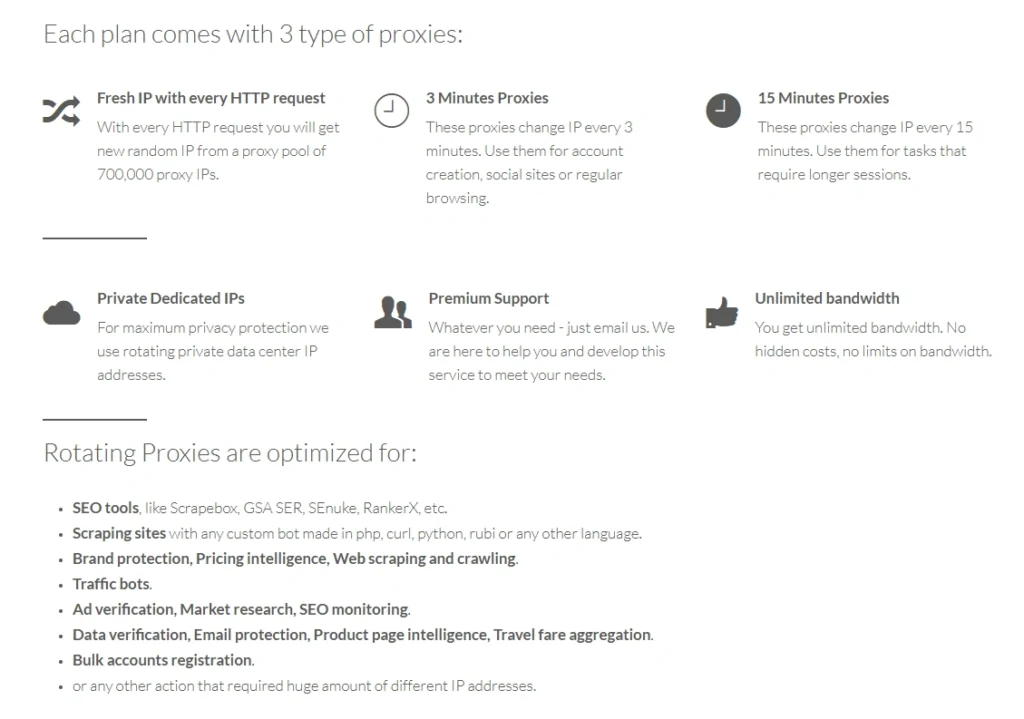
Backconnect rotating proxies generally support automatic IP rotation, including timed rotation windows such as 3 or 15 minutes according to recent third-party testing summaries.
Cons
1. Not ideal for enterprise scraping
Storm Proxies lacks advanced scraping APIs, browser automation tools, Web Unlocker features, and high-end data collection products.
2. Limited geo-targeting
If you need city-level targeting, mobile carrier selection, ASN filtering, or strict country-level scale, Storm Proxies may feel too basic.
3. Smaller feature set than premium rivals
Bright Data, Oxylabs, Decodo, and NetNut offer broader proxy controls and larger enterprise tooling stacks.
4. Support is not its strongest selling point
TechRadar’s 2025 review noted that Storm Proxies uses email-based support and lacks some real-time support features found in larger platforms.
Storm Proxies Proxy Types Explained
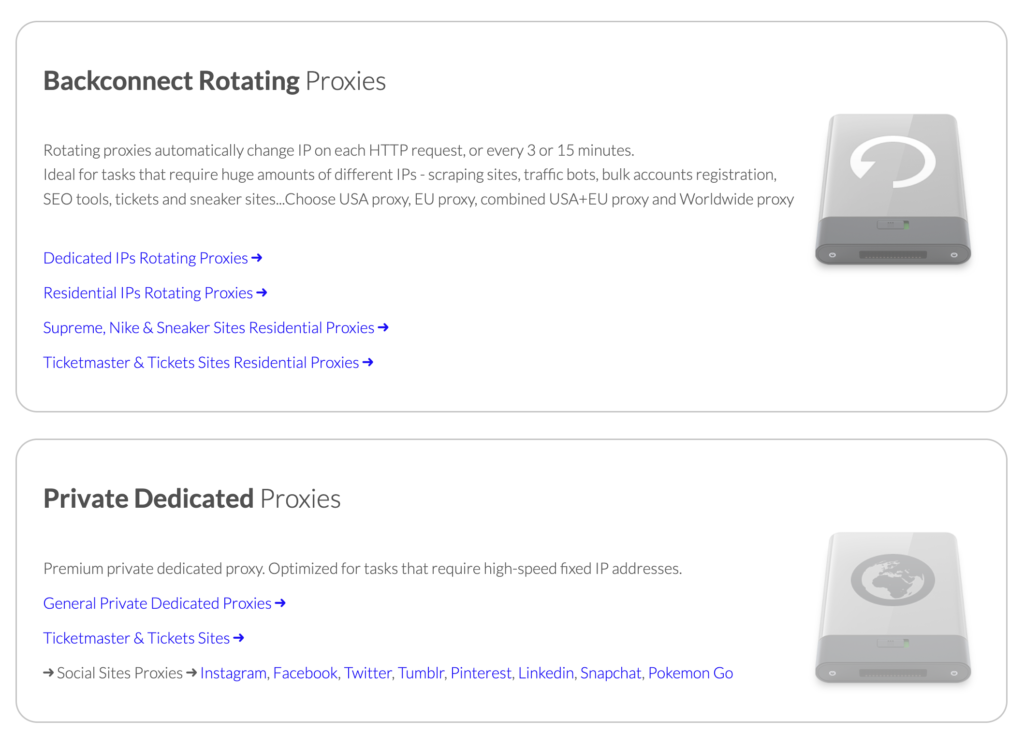
1. Private Dedicated Proxies
Private dedicated proxies are static datacenter IPs assigned to you. These are best when you need consistency rather than heavy rotation.
Use them for:
- SEO rank tracking
- Account login sessions
- Social media tools
- Light automation
- Web testing
- Market monitoring
These proxies are cheap, fast, and easy to manage. The trade-off is that datacenter IPs are easier for strict websites to detect compared to residential proxies.
2. Backconnect Rotating Proxies
Backconnect proxies give you one gateway endpoint, while Storm rotates the backend IPs for you. This is easier than manually changing proxy lists.
Use them for:
- Web scraping
- Google scraping with caution
- Bulk checking tasks
- Price tracking
- Data collection scripts
- Bot testing
The key benefit is that you do not need to manage thousands of IPs manually. You connect to one proxy gateway and let the provider handle IP rotation.
3. Residential Rotating Proxies
Residential proxies route traffic through real ISP-like IP addresses. These are usually better for websites that block datacenter proxies quickly.
Use them for:
- E-commerce scraping
- Ad verification
- Travel fare monitoring
- Marketplace research
- Localized browsing
- High-friction websites
Storm Proxies’ residential plans are more useful when you need fewer blocks, but they still may not match enterprise residential networks in targeting precision.
Storm Proxies Performance Review
Storm Proxies performs best when the task is simple, repetitive, and not too sensitive.
For example, if you are scraping low-friction websites, checking SERPs, managing a few accounts, or running small sneaker tasks, Storm Proxies can be cost-effective. If you are scraping protected websites at high volume, you will likely hit limitations.
The provider advertises a 1GB network optimized for fast multi-threaded tools.That is useful for speed-focused users, but speed alone does not guarantee success. Proxy success depends on IP trust, rotation timing, headers, fingerprinting, request behavior, and target-site defenses.
Pro Tip
Before scaling any proxy provider, test it against your exact target site. A proxy that works beautifully on one website can fail badly on another.
Massive Storm Proxies Comparison Table
| Provider | Best For | Proxy Types | Pricing Style | Strength | Weakness |
| Storm Proxies | Beginners, small scraping, sneaker users | Residential, backconnect, dedicated | Monthly plans | Cheap, simple, unlimited bandwidth | Limited controls |
| Webshare | Budget datacenter and residential users | Datacenter, static residential, residential | Flexible plans | Great dashboard, low pricing | Less premium support |
| IPRoyal | Affordable residential proxies | Residential, datacenter, mobile, sneaker | Per GB and plans | Cheap residential traffic | Mixed performance by target |
| Smartproxy/Decodo | SMB scraping and automation | Residential, mobile, datacenter, APIs | Per GB and plans | Clean UI, good coverage | More expensive than Storm |
| Oxylabs | Enterprise scraping | Residential, mobile, datacenter, APIs | Premium pricing | Huge network, powerful tools | Expensive |
| Bright Data | Advanced data collection | Residential, mobile, ISP, datacenter | Flexible but complex | Best controls and compliance tools | Steep learning curve |
| NetNut | Business-grade residential access | Residential, ISP, mobile | Plan-based | Strong stability | Higher entry pricing |
| SOAX | Geo-targeted residential/mobile | Residential, mobile, ISP | Per GB | Strong targeting | Can get costly |
| PacketStream | Ultra-cheap residential traffic | Residential P2P | Per GB | Very low price | Basic features |
Storm Proxies vs Webshare
Webshare is usually the better option if you want a modern dashboard, flexible plan customization, and a cleaner self-serve proxy experience.
Storm Proxies is better if you want simple monthly pricing and do not care about advanced controls.
- Choose Storm Proxies if you want:
- Simple setup
- Unlimited bandwidth plans
- Cheap private proxies
- Basic rotating proxies
- Choose Webshare if you want:
- Better UI
- More plan flexibility
- Cleaner proxy list management
- More modern controls
Storm Proxies vs Smartproxy
Smartproxy, now also branded as Decodo in some contexts, is a more polished proxy platform with stronger tooling, broader IP coverage, and better support for professional scraping workflows. TechRadar’s 2026 proxy guide ranked Decodo highly for its large IP pool and broader scraping features.
Storm Proxies wins on simplicity and low starting cost.
Smartproxy wins on scale, features, targeting, and reliability.
Storm Proxies vs Oxylabs
This is not really a fair fight.
Oxylabs is built for enterprise teams that need data extraction infrastructure, large residential pools, scraping APIs, unblockers, and compliance-heavy workflows. Storm Proxies is built for smaller users who want affordable proxy access without complexity.
Choose Storm Proxies for budget work.
Choose Oxylabs for business-critical scraping.
How to Choose the Right Storm Proxies Plan
Step 1: Decide Between Static and Rotating Proxies
If you need a stable IP for logins, tools, dashboards, or account sessions, choose private dedicated proxies.
If you need to scrape many pages, avoid repeated IP use, or reduce blocking, choose rotating proxies.
Step 2: Check Your Target Website’s Strictness
For easy websites, datacenter proxies may work fine.
For stricter websites, residential rotating proxies are safer.
For highly protected websites, Storm Proxies may not be enough. You may need a premium provider with better IP reputation, session control, browser fingerprinting support, and scraping APIs.
Step 3: Understand Rotation Timing
Rotation matters more than beginners think.
Per-request rotation is best when each request can use a fresh IP.
3-minute rotation is useful for short sessions.
15-minute rotation is better when the website expects session consistency.
Step 4: Test Before Scaling
Start small. Run real tasks. Measure:
- Success rate
- Block rate
- CAPTCHA rate
- Average response time
- Session stability
- Cost per successful request
Do not judge proxies by price alone.
Real-World Use Cases: Where Storm Proxies Actually Works
Storm Proxies shines when expectations are realistic. It is not built to bypass enterprise-grade anti-bot systems, but it handles everyday proxy tasks surprisingly well.
1. SEO Tracking and SERP Monitoring
If you run rank trackers, keyword tools, or scrape search results lightly, Storm Proxies gets the job done. Private dedicated proxies are especially useful here because they provide stable IPs with consistent identity.
Where it works best:
- Tracking Google rankings at low frequency
- Checking localized SERPs
- Monitoring competitors
Where it struggles:
- High-frequency scraping
- Aggressive automation across multiple keywords simultaneously
2. Sneaker Bots and Limited Release Monitoring
Storm Proxies has positioned itself as a budget option for sneaker users. It offers rotating residential proxies designed to reduce bans during product drops.
That said, serious sneaker resellers often move to premium providers for better success rates.
Good for:
- Beginners testing sneaker bots
- Small-scale drops
- Backup proxy pools
Not ideal for:
- High-stakes limited releases
- Large bot networks
3. E-commerce and Price Monitoring
For scraping product listings, price comparisons, and inventory checks, Storm Proxies can be cost-efficient.
Works well when:
- Target sites are not heavily protected
- Scraping frequency is moderate
- Data volume is manageable
Fails when:
- Websites deploy strong anti-bot protection
- You need city-level targeting or localized inventory data
4. Social Media Automation
Dedicated proxies from Storm Proxies are commonly used with social media tools.
Use cases:
- Managing multiple accounts
- Posting automation
- Growth tools
Be careful here. Platforms like Instagram and Facebook have strict detection systems. Even residential proxies can get flagged if behavior patterns look unnatural.
5. Market Research and Lead Generation
For scraping directories, collecting emails, or gathering public business data, Storm Proxies is a practical budget option.
It works best when:
- You scrape structured, low-security sites
- You do not need deep anti-detection setups
- You are not running millions of requests per day
Deep Dive: IP Pools and Rotation Strategy (The Part Most People Ignore)
If you are serious about proxies, this section matters more than pricing.
What Is an IP Pool?
An IP pool is the collection of IP addresses your proxy provider rotates through.
Storm Proxies claims millions of residential IPs, but pool size alone does not tell the full story.
You need to think about:
- IP freshness
- Reputation score
- Geographic diversity
- Rotation frequency
- Shared vs exclusive usage
Shared vs Dedicated Pools
Storm Proxies mostly uses shared pools for rotating proxies.
That means:
- Multiple users may use the same IPs
- Some IPs may already be flagged on certain sites
- Success rate can vary depending on timing
Dedicated proxies avoid this problem but lack rotation.
Rotation Protocols Explained
Storm Proxies typically offers three rotation behaviors:
1. Per Request Rotation
Every request uses a new IP.
Best for:
- Scraping
- Avoiding blocks
- High-volume crawling
Downside:
- No session persistence
2. Time-Based Rotation (3 or 15 minutes)
IP stays the same for a fixed duration.
Best for:
- Sessions
- Login flows
- Add-to-cart processes
Downside:
- Risk of blocks if too many requests in that window
3. Sticky Sessions
You maintain the same IP until session expires.
Best for:
- Account management
- Checkout processes
- Logged-in browsing
Best Alternatives to Storm Proxies (When You Outgrow It)
1. Bright Data
Best for enterprise users.
Why switch:
- Massive IP pool
- Advanced tools like Web Unlocker
- Strong compliance systems
Trade-off:
- Expensive
- Complex setup
2. Oxylabs
Best for large-scale scraping teams.
Why switch:
- High success rates
- Strong residential and mobile proxies
- Data scraping APIs
Trade-off:
- Premium pricing
3. Smartproxy
Best balance between price and performance.
Why switch:
- Easy dashboard
- Reliable residential proxies
- Good support
Trade-off:
- Bandwidth-based pricing
4. IPRoyal
Best budget residential alternative.
Why switch:
- Pay-as-you-go options
- Affordable entry
Trade-off:
- Performance can vary
5. Webshare
Best for modern UI and flexible plans.
Why switch:
- Clean dashboard
- Customizable proxy lists
- Affordable pricing
Trade-off:
- Not as strong for high-end scraping
Final Verdict: Should You Use Storm Proxies in 2026?
Storm Proxies is not trying to compete with enterprise proxy giants, and that is exactly why it still has a place in the market.
If you are:
- A beginner
- Running small scraping tasks
- Managing SEO tools
- Testing automation workflows
- Looking for predictable monthly pricing
Then Storm Proxies is a solid entry point.
If you are:
- Running large-scale scraping operations
- Dealing with strict anti-bot systems
- Needing precise geo-targeting
- Building a data-driven business
FAQs: Storm Proxies (People Also Ask)
1. Is Storm Proxies good for scraping?
Yes, but only for small to medium scraping tasks. It works well on low-protection websites but struggles with advanced anti-bot systems.
2. Does Storm Proxies offer unlimited bandwidth?
Many plans include unlimited bandwidth, especially private dedicated proxies. Always confirm the plan details before purchasing.
3. Are Storm Proxies residential or datacenter?
They offer both. Dedicated proxies are typically datacenter-based, while rotating proxies include residential IPs.
4. Is Storm Proxies good for sneaker bots?
It can work for beginners and smaller drops, but serious sneaker users usually prefer premium providers for better success rates.
5. How does Storm Proxies rotation work?
It offers per-request rotation and time-based rotation like 3-minute or 15-minute sessions, depending on the plan.