
Best Proxies for YouTube.
YouTube looks simple from the outside: videos, comments, channels, rankings, thumbnails, descriptions, playlists, and engagement signals. Under the hood, it is one of the toughest platforms to collect public data from at scale.
A small manual check is easy. Open a video, check the title, note the view count, read comments, done. But try doing that across 10,000 videos, 500 channels, multiple countries, and different time windows. That is where everything starts to break.
Requests slow down. IPs get rate-limited. Some pages load differently by country. Comments behave unpredictably. Search results change based on region, device, language, and history. If your proxy setup is weak, your YouTube workflow becomes messy very quickly.
That is why the best YouTube proxies in 2026 are not just “cheap IPs.” You need clean IP pools, smart rotation, sticky sessions, strong geo-targeting, SOCKS5 or HTTPS support, and enough reliability to handle repeated requests without turning your data pipeline into a guessing game.
A quick compliance note before we get into the list: YouTube’s own developer policies restrict scraping YouTube applications and Google applications, and public search engines are only given limited scraping carve-outs under robots.txt or written permission. Use proxies responsibly, collect only permitted public data, respect platform rules, and get legal advice for commercial data collection.
What Makes a Proxy Great for YouTube?
A good YouTube proxy needs to solve four problems: trust, location, consistency, and scale.
Trust matters because YouTube can treat traffic differently based on IP reputation. Datacenter proxies are fast and cheap, but they are easier to identify as non-consumer traffic. Residential proxies usually look more natural because they use ISP-assigned IP addresses tied to real locations. That is why residential proxies are often the safest default for YouTube scraping, rank tracking, comment monitoring, and regional checks.
Location accuracy matters because YouTube results can vary by country, city, language, and sometimes even network type. A video ranking in the United States may not look the same in India, Germany, Brazil, or Canada. If you are tracking YouTube SEO, ad placements, competitor content, or creator visibility, country-level targeting is the minimum. City-level targeting is better when your campaigns depend on local intent.
Consistency matters when your task needs session continuity. For example, if you are loading a video page, checking comments, expanding replies, and moving through related videos, changing the IP too aggressively can create unstable sessions. Sticky sessions help because they keep the same IP for a defined period.
Scale matters when your workload grows. You may start with 1,000 URLs per month, but a serious YouTube data operation can quickly hit millions of requests. At that point, the provider’s IP pool size, bandwidth pricing, rotation controls, uptime, dashboard, API access, and support quality all become important.
For YouTube, I usually think of proxies in three buckets:
| Proxy Type | Best For YouTube Use Case | Strength | Weakness |
|---|---|---|---|
| Residential proxies | Scraping public metadata, comments, rankings, geo checks | Better trust and geo coverage | More expensive than datacenter |
| Datacenter proxies | Lightweight testing, fast checks, simple monitoring | Cheap and fast | Higher block risk |
| ISP/static residential proxies | Long sessions, account-safe workflows, ad verification | Stable identity with residential-like trust | Limited locations and higher cost |
| Mobile proxies | Mobile SERP checks, app-like behavior, high trust tasks | Strong reputation and carrier IPs | Expensive and often overkill |
Pro Tip: Do not rotate IPs after every single request by default. For YouTube, aggressive rotation can look less natural than controlled rotation. Use rotating residential proxies for large URL lists, but use sticky sessions when you need to load related assets, comments, replies, and localized views from the same environment.
7 Best Proxies for YouTube in 2026
#1: Oxylabs: Best Overall YouTube Proxy

Oxylabs is the safest “enterprise-first” pick for YouTube scraping, large-scale public data collection, and demanding geo-targeted workflows. It is not the cheapest provider here, but it has the network depth, infrastructure, and tooling that serious teams usually need once YouTube data collection becomes part of a business process.
The company advertises a huge proxy network, including 175M+ residential IPs and 2M datacenter IPs, along with scraping tools such as Web Unblocker, Web Scraper API, and other data collection products. Its residential proxy product supports city-level targeting and SOCKS5, which is useful when you need a mix of location precision and protocol flexibility.
For YouTube, Oxylabs makes the most sense when you are doing high-volume public metadata monitoring, video rank checks, market research, ad verification, or creator intelligence across multiple regions. It is also a strong fit if your team wants a provider that can support custom setups, not just a basic proxy dashboard.
Where Oxylabs stands out is reliability. If you are running crawlers at scale, cheap proxies can become expensive when they waste engineering hours. Oxylabs is built for teams that care about success rate, uptime, support, and clean infrastructure.
The downside is price. Small users may find it heavier than needed, especially if they only want to test a few YouTube pages or scrape small batches of public metadata. But for agencies, SaaS teams, SEO platforms, media intelligence tools, and larger data operations, Oxylabs is one of the strongest YouTube proxy choices in 2026.
Best for: Enterprise YouTube scraping, regional rank tracking, large data pipelines, public video metadata collection.
Pros
| Pros | Why It Matters |
|---|---|
| Huge residential IP pool | Better coverage for multi-country YouTube checks |
| City-level targeting | Useful for localized YouTube visibility research |
| SOCKS5 support | Helpful for flexible integrations |
| Strong scraping ecosystem | Good for teams that need more than raw proxies |
| Enterprise-grade support | Better for complex, high-volume projects |
Cons
| Cons | Why It Matters |
|---|---|
| Higher cost than budget providers | Not ideal for casual users |
| May feel complex for beginners | More suitable for technical teams |
| Overkill for small one-off scraping jobs | Smaller projects may not need this much infrastructure |
Pro Tip: Use Oxylabs residential proxies for YouTube data collection where accuracy matters, but test datacenter proxies for low-risk pages first. If datacenter IPs work for a specific workflow, you can save budget and reserve residential traffic for tougher routes.
#2: Decodo: Best Value YouTube Proxy

Decodo, formerly Smartproxy, is one of the best value choices for YouTube proxy users who want strong infrastructure without jumping straight into enterprise pricing. The rebrand is official, and Decodo now positions itself as the new home for Smartproxy users with 125M+ IPs.
For YouTube use cases, Decodo works well for creators, agencies, SEO teams, and developers who need residential proxies for search result checks, video metadata scraping, public comment analysis, and regional content visibility testing. It offers a strong balance between price, dashboard usability, location coverage, and technical flexibility.
Decodo’s residential pricing page lists plans starting from around $2/GB, with smaller regular plans priced higher per GB depending on bandwidth. That makes it more accessible than some premium providers while still giving you a serious proxy network.
The best thing about Decodo is that it feels practical. You do not need to be an enterprise buyer to get started. The dashboard is easier to understand than many old-school proxy platforms, and the pricing is friendly enough for mid-sized projects.
For YouTube, Decodo is especially useful if you need a repeatable workflow: monitor rankings, check video pages from different regions, verify public video metadata, test localization, and collect public engagement signals.
Best for: Agencies, SEO teams, YouTube marketers, developers, and growing scraping projects.
Pros
| Pros | Why It Matters |
|---|---|
| Strong value for the network size | Good balance of cost and reliability |
| 125M+ IPs | Solid coverage for global YouTube checks |
| Beginner-friendly dashboard | Easier setup for non-enterprise users |
| Flexible residential plans | Good for scaling gradually |
| Good scraping ecosystem | Useful beyond YouTube |
Cons
| Cons | Why It Matters |
|---|---|
| Not always the cheapest per GB | Budget providers may cost less |
| Advanced users may want deeper controls | Enterprise setups may prefer Oxylabs or Bright Data |
| Pricing varies by plan size | Small plans cost more per GB |
Pro Tip: Decodo is a smart first paid proxy choice if you are moving from free proxies or basic datacenter IPs. Start with a smaller residential plan, test your YouTube workflow, then scale only after you know your request volume and success rate.
#3: Webshare: Best Free YouTube Proxy Tier

Webshare is the best option here for users who want a free or low-cost proxy starting point. It is not the most advanced YouTube scraping provider, but it is excellent for testing, small projects, lightweight monitoring, and simple proxy workflows.
Webshare’s pricing page lists rotating residential proxies from $1.40/GB, static residential proxies from $0.23/IP, and datacenter proxy servers from $0.05/IP. It also promotes 10 free proxies, which makes it one of the easiest platforms to try without committing money upfront.
For YouTube, Webshare is a good fit if you are testing scripts, checking basic access, learning proxy rotation, or running small-scale monitoring jobs. It is also useful for developers who want clear pricing and a simple dashboard instead of a complicated enterprise sales process.
The tradeoff is that Webshare does not offer the same advanced scraping APIs, managed unblocker tools, or enterprise support depth that you get from Oxylabs, Bright Data, or Decodo. If YouTube is a major data source for your business, Webshare may become limiting as you scale.
Still, for budget-conscious users, it is hard to ignore. You get a clean starting point, flexible proxy types, and enough control to run basic YouTube proxy tests.
Best for: Beginners, small YouTube scraping tests, low-budget monitoring, simple proxy workflows.
Pros
| Pros | Why It Matters |
|---|---|
| Free proxy tier | Easy to test before buying |
| Low entry pricing | Good for budget users |
| Residential and datacenter options | Flexible for different workflows |
| Simple dashboard | Beginner-friendly setup |
| Good for testing scripts | Useful before scaling elsewhere |
Cons
| Cons | Why It Matters |
|---|---|
| Less advanced scraping tooling | Not ideal for complex YouTube pipelines |
| Support is not as deep as premium providers | Enterprise teams may need more help |
| Datacenter proxies may struggle on tougher tasks | Residential proxies are safer for YouTube |
Pro Tip: Use Webshare to test your YouTube scraper logic, headers, parsing, and request volume. Once your system works, move high-value jobs to residential proxies or a managed scraping API.
#4: SOAX: Best YouTube Proxy for Geo-Specific Scraping

SOAX is a strong choice when geo-targeting is the priority. For YouTube, that matters a lot. Search results, recommendations, availability, ads, language signals, and ranking behavior can change across regions.
SOAX advertises residential proxies with 155M+ IPs across 195+ locations, and its residential proxy page lists plans starting around $3.60/GB on the Starter plan. Its help documentation also shows country-level targeting through the dashboard’s quick connect flow.
This makes SOAX useful for YouTube SEO teams, agencies, researchers, and brands that care about regional accuracy. If you need to see how a video appears in Canada versus the United States, or Germany versus Australia, SOAX gives you the location controls needed for that kind of work.
The provider also has a reputation for clean dashboard controls and flexible targeting. That is helpful when your YouTube workflow is not just “scrape this list.” Many real workflows need country-specific sessions, recurring checks, and clean separation between markets.
The downside is cost. SOAX is not the cheapest provider here, especially compared with DataImpulse or Webshare. But if your work depends on geo-specific accuracy, paying more for better targeting can make sense.
Best for: Geo-targeted YouTube scraping, localized rank tracking, regional content checks, market research.
Pros
| Pros | Why It Matters |
|---|---|
| Strong geo-targeting | Useful for localized YouTube data |
| Large residential pool | Good for multi-region scraping |
| Country-level controls | Helps compare markets |
| Clean dashboard | Easier proxy management |
| Good fit for agencies | Useful for client reporting |
Cons
| Cons | Why It Matters |
|---|---|
| Higher starting cost than budget providers | Not ideal for tiny projects |
| May be more than beginners need | Best for targeted workflows |
| Large plans can get expensive | Cost control matters at scale |
Pro Tip: For YouTube SEO tracking, keep separate proxy profiles for each target country. Mixing locations in one workflow can pollute your data and make rankings harder to interpret.
#5: DataImpulse: Best Budget YouTube Proxy
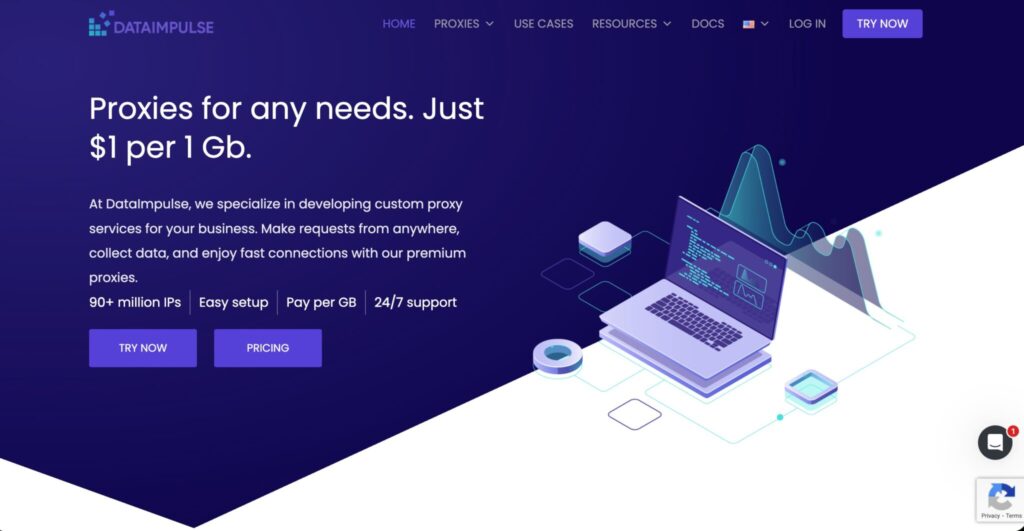
DataImpulse is the budget pick for YouTube proxy users who want residential proxies at a very low per-GB cost. Its official website promotes proxy services at $1 per GB, with 90M+ IPs, pay-per-GB pricing, easy setup, and 24/7 support.
For YouTube, DataImpulse is useful when you need affordable residential traffic for bulk checks, testing, metadata collection, or early-stage scraping projects. It is not as polished as Oxylabs or Bright Data, but its pricing is attractive.
The best use case is volume testing. If you are building a YouTube data workflow and do not yet know your bandwidth needs, DataImpulse lets you experiment without burning through a premium proxy budget. It is also helpful for projects where perfect enterprise support is less important than keeping costs low.
DataImpulse also notes that traffic does not expire on some use-case pages, which is useful for users with uneven workloads. If your YouTube scraping runs in batches instead of daily pipelines, non-expiring traffic can reduce waste.
The tradeoff is that low-cost providers usually require more testing. You should monitor success rates, location accuracy, timeout behavior, and IP quality before relying on them for mission-critical work.
Best for: Budget YouTube scraping, bulk testing, small teams, experimental data workflows.
Pros
| Pros | Why It Matters |
|---|---|
| Very low residential pricing | Strong for cost-sensitive projects |
| 90M+ IPs | Good pool size for the price |
| Pay-per-GB model | Easier budget control |
| Good for testing at scale | Useful for early-stage workflows |
| Simple setup | Lower learning curve |
Cons
| Cons | Why It Matters |
|---|---|
| Less enterprise polish | May require more manual testing |
| Not the best for complex workflows | Premium providers offer better tooling |
| Support depth may vary by need | Large teams may want stronger account management |
Pro Tip: With budget proxies, test before scaling. Run a sample set of YouTube URLs across different countries, track success rates, and compare the data quality before buying large bandwidth blocks.
#6: IPRoyal: Best YouTube Proxy for Bulk Bandwidth

IPRoyal is a practical proxy provider for users who want flexible pricing, non-expiring residential traffic, and a simple buying experience. Its official pricing page lists residential proxies from $1.75/GB at bulk scale, a 32M+ proxy pool, and traffic that never expires.
For YouTube, IPRoyal is especially useful for periodic scraping or monitoring workflows. Many YouTube projects do not run evenly every day. You might scrape heavily during a campaign launch, pause for a week, then run another batch. Non-expiring traffic helps because unused bandwidth does not vanish at the end of the month.
IPRoyal also offers residential, ISP, datacenter, and mobile proxy options. That gives you room to test different proxy types depending on the task. Residential proxies are better for public YouTube data collection. ISP proxies can be useful when you need longer sessions and stable identities. Datacenter proxies can work for lighter checks where block risk is low.
The main limitation is that IPRoyal’s residential pool is smaller than Oxylabs, Bright Data, Decodo, or SOAX. That does not make it weak, but it does mean large enterprise workloads may need more careful testing.
Best for: Bulk bandwidth, periodic scraping, budget-conscious residential proxy users.
Pros
| Pros | Why It Matters |
|---|---|
| Non-expiring traffic | Good for uneven YouTube workloads |
| Bulk pricing can be attractive | Better value at higher volumes |
| Multiple proxy types | Flexible testing options |
| Simple dashboard | Easy for small teams |
| Good cost-control option | Useful for campaigns and batch jobs |
Cons
| Cons | Why It Matters |
|---|---|
| Smaller pool than top enterprise providers | May matter for large global scraping |
| PAYG pricing starts higher before discounts | Bulk buying gets better rates |
| Less advanced than managed scraping platforms | Not a full YouTube scraping API |
Pro Tip: IPRoyal works well when you want to buy residential bandwidth and use it slowly across multiple YouTube projects. For daily enterprise-scale pipelines, compare its success rate against Oxylabs, Decodo, and Bright Data before committing.
#7: Bright Data: Best Dedicated YouTube Scraper and Proxy Stack

Bright Data is more than a proxy provider. For YouTube specifically, that is its biggest advantage. It offers a dedicated YouTube Scraper API that can collect video URLs, titles, creators, video length, likes, views, comments, replies, and other structured data points. Its documentation says the YouTube Scraper API handles proxies, CAPTCHAs, and parsing so teams can focus on the data pipeline.
Bright Data also advertises 400M+ monthly residential IPs across 195 countries, with sticky and rotating sessions, geo-targeting, and residential proxy pricing starting from $5.88/GB on its official pricing page.
This makes Bright Data the best pick when you do not want to build everything manually. Instead of stitching together proxies, headers, parsers, retries, and anti-blocking logic, you can use its scraping products or combine raw proxies with higher-level tools.
For YouTube, Bright Data is ideal for data teams, SaaS platforms, media intelligence companies, brand monitoring tools, and researchers who need structured data at scale. It is also useful when engineering time is more expensive than proxy bandwidth.
The downside is pricing and complexity. Bright Data is powerful, but it is not the simplest or cheapest provider. Small users may feel overwhelmed. But if YouTube data is core to your product or reporting workflow, Bright Data deserves a serious look.
Best for: Dedicated YouTube data extraction, structured scraping, enterprise data workflows, managed scraping infrastructure.
Pros
| Pros | Why It Matters |
|---|---|
| Dedicated YouTube Scraper API | Reduces engineering work |
| 400M+ monthly residential IPs | Huge global proxy footprint |
| Structured data output | Better for analytics pipelines |
| Handles proxy and parsing complexity | Saves developer time |
| Strong enterprise tooling | Useful for serious data teams |
Cons
| Cons | Why It Matters |
|---|---|
| More expensive than budget providers | Not ideal for small projects |
| Can feel complex at first | Better for technical teams |
| Managed tools may be overkill | Raw proxy users may not need everything |
Pro Tip: Choose Bright Data if you want YouTube data, not just YouTube proxies. If your team is already spending time fixing parsers, handling failed requests, and cleaning messy output, a managed YouTube scraper can be cheaper in the long run.
Quick Comparison for YouTube Proxies
| Provider | Best For | Proxy Pool / Coverage | Starting Price Signal | Best Proxy Type for YouTube | Rotation Support | Geo Targeting | Technical Fit | Main Weakness |
|---|---|---|---|---|---|---|---|---|
| Oxylabs | Best overall YouTube proxy | 175M+ residential IPs, 2M datacenter IPs | Premium pricing | Residential, datacenter, Web Unblocker | Yes | Country/city targeting | Advanced teams, enterprises | Expensive for small users |
| Decodo | Best value YouTube proxy | 125M+ IPs | Residential from around $2/GB | Residential | Yes | Global targeting | Agencies, developers, SEO teams | Not the cheapest at small volumes |
| Webshare | Best free tier | 80M+ residential IPs listed on pricing page | Free proxies, residential from $1.40/GB | Residential, datacenter | Yes | Country targeting on paid plans | Beginners, testers | Limited advanced scraping tools |
| SOAX | Best geo-specific scraping | 155M+ IPs, 195+ locations | Starter around $3.60/GB | Residential | Yes | Strong country-level controls | Geo-focused teams | Cost can rise quickly |
| DataImpulse | Best budget option | 90M+ IPs | $1/GB | Residential | Yes | Country and location controls depending on setup | Budget scrapers, testers | Needs more testing for critical workflows |
| IPRoyal | Best for bulk bandwidth | 32M+ residential pool | From $1.75/GB at bulk scale | Residential, ISP | Yes | 195 countries listed | Batch scraping, periodic workloads | Smaller pool than top enterprise tools |
| Bright Data | Best dedicated YouTube scraper | 400M+ monthly residential IPs | Residential from $5.88/GB | YouTube Scraper API, residential | Yes | 195 countries | Data teams, SaaS, enterprise scraping | Higher price and complexity |
How to Choose the Best YouTube Proxy
1. Match the Proxy Type to the YouTube Task
Do not buy the biggest proxy plan before you define the job.
If you are checking a few video pages, datacenter proxies may be enough. If you are collecting public metadata at scale, residential proxies are usually safer. If you need stable long sessions, look at ISP or static residential proxies. If you are testing mobile-specific visibility, mobile proxies may help, but they are often expensive.
For most YouTube scraping and monitoring projects, rotating residential proxies are the best starting point.
2. Check IP Pool Size, But Do Not Worship It
A large IP pool is useful, but raw numbers do not guarantee performance. A provider with 400M IPs can still be wrong for your workflow if targeting, rotation, or session control does not fit your needs.
Look at:
| Factor | Why It Matters |
|---|---|
| Residential IP pool | Better trust for YouTube workflows |
| Location coverage | Needed for regional video checks |
| ASN diversity | Helps avoid patterns |
| Session controls | Important for comments and multi-step flows |
| Failure handling | Saves time during large crawls |
3. Use Sticky Sessions for Multi-Step YouTube Workflows
If your scraper opens a video page, expands comments, loads replies, checks channel info, and then moves to related videos, do not rotate too fast. A sticky session keeps the same IP long enough to complete the task.
Use shorter sessions for simple URL checks. Use longer sticky sessions for workflows that behave more like a real browsing journey.
4. Prioritize Geo-Targeting for YouTube SEO
YouTube visibility is not universal. A keyword can show different videos based on country, language, and user context.
If you are tracking YouTube SEO, choose a provider with strong country targeting at minimum. For local campaigns, city-level targeting is better.
Best geo-focused picks from this list: SOAX, Oxylabs, Bright Data, and Decodo.
5. Watch Bandwidth Costs
YouTube pages can be heavy. Video pages, thumbnails, scripts, comments, and related assets can eat bandwidth if your scraper is not optimized.
Do not load full media unless you need it. Block unnecessary assets where allowed. Cache repeated requests. Pull only the data you need.
Budget-friendly picks: DataImpulse, Webshare, and IPRoyal.
6. Do Not Ignore Compliance
A proxy is not permission. It only changes how requests are routed.
Before scraping YouTube data, review YouTube’s terms, API policies, robots.txt guidance, privacy laws, and your intended use case. For commercial use, especially if you collect comments or user-related data, get legal review.
FAQs: Best Proxies For YouTube 2026
What type of proxy is best for YouTube scraping?
Residential proxies are usually the best starting point for YouTube scraping because they use ISP-assigned IPs and look closer to normal user traffic than datacenter proxies. For large-scale public metadata collection, rotating residential proxies work well. For longer sessions, ISP or static residential proxies may be better.
Does YouTube block proxies?
Yes, YouTube can limit, challenge, or block suspicious traffic patterns. The issue is not only the proxy. Request speed, headers, cookies, session behavior, repeated patterns, and low-quality IPs can all trigger problems. Clean residential proxies help, but they do not replace responsible scraping practices.
Is scraping YouTube data legal?
It depends on what you collect, how you collect it, where you operate, and whether your activity violates YouTube’s terms or applicable laws. YouTube’s developer policies restrict scraping YouTube applications and obtaining scraped YouTube data through API clients. For business use, get legal advice before building a scraping workflow.
Are free proxies good for YouTube?
Free proxies are fine for learning and very basic testing, but they are not reliable for serious YouTube scraping. They are often slow, overloaded, shared by too many users, and more likely to have poor IP reputation. Webshare is the best option here if you want a legitimate free starting point.
Which proxy is best for YouTube geo-targeting?
SOAX is one of the strongest choices for geo-specific YouTube scraping because of its location controls. Oxylabs, Bright Data, and Decodo are also strong options for country-level and city-level targeting, depending on your budget and workflow.
Should I use datacenter proxies for YouTube?
Datacenter proxies can work for lightweight checks and testing, but they are easier to detect than residential proxies. Use them when cost and speed matter more than trust. For serious YouTube scraping, residential proxies are usually safer.
What is the cheapest YouTube proxy provider?
DataImpulse is one of the cheapest residential proxy providers on this list, with pricing promoted at $1/GB. Webshare is also very affordable and has a free tier. IPRoyal can become cost-effective at bulk residential bandwidth levels.
Is Bright Data better than Oxylabs for YouTube?
Bright Data is better if you want a dedicated YouTube Scraper API with structured output. Oxylabs is better if you want a powerful enterprise proxy network and broader scraping infrastructure. Both are premium choices, but they solve slightly different problems.
How many proxies do I need for YouTube scraping?
It depends on request volume, target regions, session length, and scraping frequency. A small project may only need a few GB of residential traffic. A serious monitoring platform may need hundreds or thousands of GB per month. Start small, measure success rates, then scale.
Conclusion | Best Proxies for YouTube 2026
The best proxy for YouTube depends on your workload.
If you want the strongest overall proxy infrastructure, choose Oxylabs. If you want the best mix of price, usability, and scale, choose Decodo. If you are testing or working with a small budget, start with Webshare or DataImpulse. If geo-targeting is the heart of your YouTube workflow, SOAX is a strong pick. If you want bulk bandwidth that does not expire, IPRoyal makes sense. If you want structured YouTube data without building the full scraping stack yourself, Bright Data is the best dedicated option.
For most users, the smartest path is simple: start with Decodo or Webshare for testing, move to Oxylabs or SOAX when your workflow needs higher reliability, and choose Bright Data when you want a managed YouTube scraping setup instead of raw proxy plumbing.