
NetNut Review.
NetNut is not the cheapest proxy provider in the market, and honestly, it does not try to be. It sits in that slightly more serious category of proxy platforms built for web scraping teams, ad verification companies, SEO platforms, price intelligence tools, travel fare monitoring, eCommerce tracking, cybersecurity research, and other use cases where “cheap rotating IPs” usually create more problems than they solve.
The big selling point is its network architecture. NetNut promotes a large proxy pool with 85 million plus residential IPs across 195 plus countries, along with mobile, ISP, static residential, and datacenter proxy options. It also highlights direct ISP style sourcing and one hop connectivity for some products, which matters for teams that care about speed, session stability, and compliance posture.
That said, NetNut is not perfect for everyone. Beginners may find the platform more “business proxy tool” than plug and play hobby software. Smaller users may also feel the pricing is heavier than budget providers. But for serious data teams, NetNut deserves attention because it balances IP scale, performance, and B2B focused infrastructure better than many mid tier proxy vendors.
What Is NetNut?

NetNut is a proxy provider focused on residential proxies, rotating residential proxies, ISP proxies, static residential proxies, mobile proxies, and datacenter proxies. Its proxies are mainly used for web scraping, SERP tracking, ad verification, eCommerce monitoring, account testing, market research, cybersecurity checks, and geo targeted browsing.
Its main proxy categories include:
| Proxy Type | Best For |
| Rotating Residential Proxies | Large scale scraping, SERP tracking, price monitoring |
| Static Residential Proxies | Stable sessions, account access, long running tasks |
| ISP Proxies | Faster residential like IPs with better stability |
| Mobile Proxies | Social platforms, app testing, mobile first environments |
| Datacenter Proxies | Speed heavy tasks with lower cost per IP |
| Web Unblocker Style Access | Harder websites where blocks and CAPTCHAs are common |
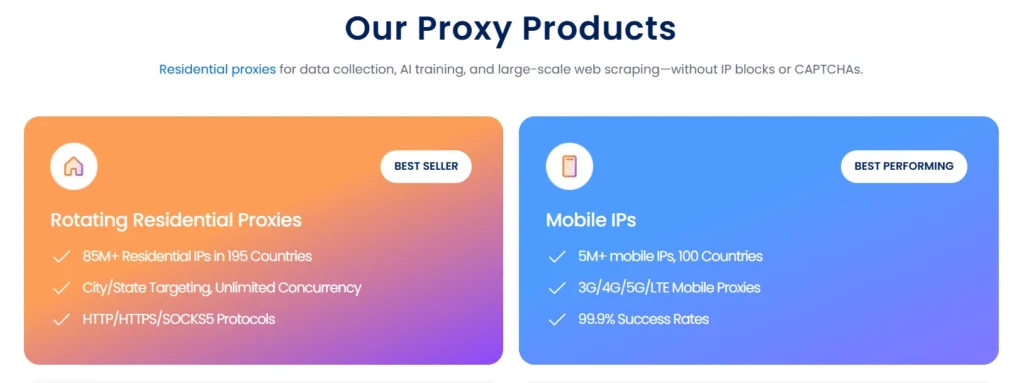
NetNut says its residential network includes 85M plus IPs, its mobile proxy pool includes 5M plus mobile IPs, and its datacenter proxy pool includes 150K plus datacenter IPs across 200 plus countries.
NetNut Review: Quick Verdict
NetNut is best for businesses that need reliable proxy infrastructure, not casual users who only need a few cheap IPs for light browsing.
It is strongest in:
| Category | Rating |
| Residential Proxy Scale | 9.2/10 |
| ISP Proxy Stability | 9/10 |
| Mobile Proxy Coverage | 8.7/10 |
| Speed and Uptime | 8.8/10 |
| Ease of Use | 8/10 |
| Pricing Flexibility | 7.5/10 |
| Enterprise Readiness | 9/10 |
| Beginner Friendliness | 7.4/10 |
My take: NetNut is a strong pick for companies that need dependable IP infrastructure with global coverage, sticky sessions, and lower block rates. It is less ideal for very small users who want cheap pay as you go testing.
NetNut Pros and Cons
Pros
Large residential IP pool
NetNut’s biggest advantage is scale. With 85M plus residential IPs across 195 plus countries, it gives data teams enough geographic coverage for international scraping, SERP monitoring, price intelligence, and localized testing.
Good mix of proxy types
You get residential, rotating residential, ISP, static residential, mobile, and datacenter proxies in one ecosystem. That makes it easier to build a blended proxy setup instead of juggling three or four providers.
Strong ISP proxy angle
NetNut’s ISP proxy offering focuses on speed, stability, one hop connectivity, and 99.99% uptime claims. For data intensive projects, ISP proxies can often feel cleaner and more stable than regular peer based residential pools.
Useful for business grade scraping
NetNut is well suited for ecommerce scraping, travel fare tracking, ad verification, SEO monitoring, brand protection, and financial data collection.
Global coverage
NetNut promotes coverage across 195 plus countries for residential proxies and 200 plus countries for datacenter proxies, which is helpful for teams that need country level testing.
Sticky and rotating sessions
NetNut’s residential proxies can rotate per request or hold sticky sessions, which is important for websites that need session continuity. Proxyway notes that sticky residential sessions can keep the same IP until it goes offline.
Cons
Not the cheapest proxy provider
NetNut is not built for people looking for $1 per GB style residential traffic. Some third party reviews place its residential pricing at competitive volume rates, but ISP and mobile proxies usually cost more.
Custom rotation controls may feel limited
Proxyway notes that while NetNut supports rotating and sticky sessions, custom rotation duration control may not be available in the same way some advanced users expect.
Better for businesses than hobby users
If you are testing small scraping scripts or need proxies for one personal use case, NetNut may feel too advanced and too expensive.
Some pricing details may require sales contact
Like many enterprise leaning proxy providers, certain plans, features, and volume discounts may require speaking with sales instead of simply buying from a public pricing page.
NetNut Pricing Review
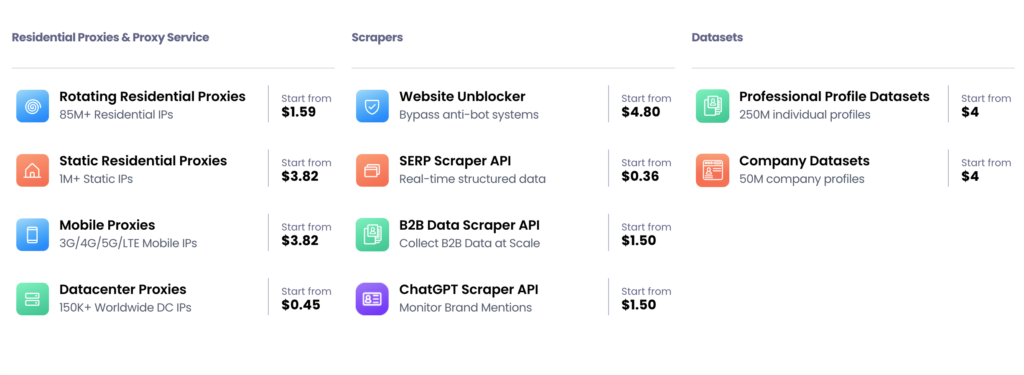
NetNut pricing depends on proxy type, bandwidth, plan size, and use case. Based on current public and third party information, rotating residential proxies may start at lower per GB rates at higher volume, while ISP and mobile proxies are usually more expensive. HostAdvice’s 2026 review mentions rotating residential pricing from $1.59 per GB, with ISP and mobile proxies listed higher from around $3.82 per GB plus.
Here is a simplified pricing expectation table:
| Proxy Type | Pricing Style | Expected Cost Level | Best For |
| Rotating Residential | Per GB | Medium | Large scale scraping |
| Static Residential | Per IP or bandwidth based | Medium to high | Stable logins and sessions |
| ISP Proxies | Usually premium | High | Fast, stable data extraction |
| Mobile Proxies | Premium bandwidth | High | App testing and social platforms |
| Datacenter Proxies | Lower cost than residential | Low to medium | Speed focused scraping |
| Enterprise Plans | Custom | Custom | High volume teams |
Is NetNut Expensive?
Compared to budget proxy sellers, yes. Compared to Bright Data, Oxylabs, SOAX, Decodo, and other premium proxy networks, NetNut is more competitive than it first appears, especially if you are buying at volume.
The better question is not “Is NetNut cheap?” It is:
Will NetNut reduce failed requests, blocked sessions, CAPTCHA friction, and engineering time enough to justify the spend?
For business scraping, that is the real pricing calculation.
NetNut Features Review
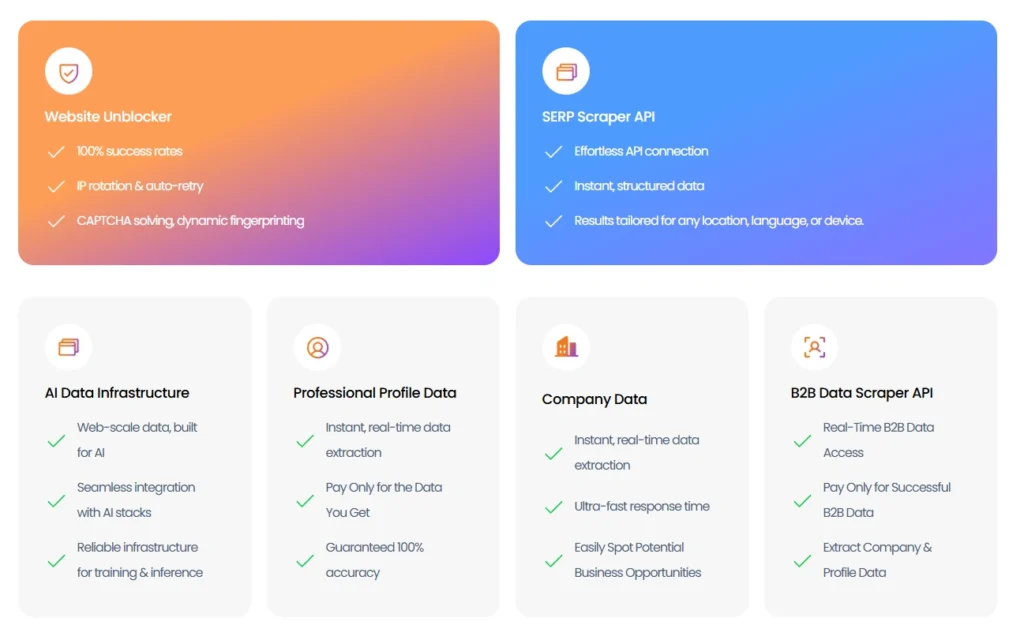
1. Rotating Residential Proxies
NetNut’s rotating residential proxies are designed for large scale data collection. These proxies change IPs automatically, helping reduce blocks when scraping websites that monitor repeat requests from the same address.
Best use cases:
| Use Case | Why It Fits |
| SERP tracking | Helps check search results by country or region |
| Ecommerce price scraping | Useful for monitoring competitor prices |
| Travel fare monitoring | Helps collect location based fare data |
| Ad verification | Lets teams test ad placements across markets |
| Market research | Supports large scale public web data collection |
NetNut says its rotating residential network combines ISP and P2P proxy infrastructure for better performance.
Pro Tip: Use rotating residential proxies for discovery tasks, not account based workflows. If a site expects session consistency, switch to sticky sessions or static residential IPs.
2. Static Residential Proxies
Static residential proxies are useful when you need the reputation of a residential IP but do not want the IP changing every few seconds.
These are better for:
| Task | Why Static Residential Works |
| Account access testing | Keeps the same IP across sessions |
| Marketplace monitoring | Reduces login friction |
| Localized browsing | Gives stable geo identity |
| Brand protection | Useful for repeated checks from same region |
| QA testing | Helps simulate real user access |
NetNut advertises over 1M static residential IPs, which gives it a solid position for users who need stable residential connections.
3. ISP Proxies
ISP proxies are one of NetNut’s stronger products. They sit between datacenter and residential proxies. You get the speed and stability closer to datacenter infrastructure, but the IPs are associated with internet service providers.
NetNut promotes ISP proxies with 1M plus IPs, 99.99% uptime, high speed extraction, and one hop connectivity.
Best for:
| Use Case | Why ISP Proxies Help |
| High speed scraping | Lower latency than many peer residential networks |
| Sneaker and retail monitoring | Stable sessions and fast response |
| SEO tools | Reliable repeated checks |
| Ad verification | Better IP trust than basic datacenter proxies |
| Business intelligence | Good for large recurring data jobs |
Pro Tip: ISP proxies are often the best middle ground when residential proxies are too slow and datacenter proxies get blocked too often.
4. Mobile Proxies
Mobile proxies route traffic through mobile carrier IPs, usually 3G, 4G, LTE, or 5G networks. NetNut says its mobile proxy network includes 5M plus mobile IPs and supports global mobile access for scraping and app related workflows.
Mobile proxies are best for:
| Use Case | Why Mobile Proxies Matter |
| Social media testing | Platforms often trust mobile IPs more |
| Mobile app QA | Simulates real mobile network users |
| Geo restricted mobile content | Checks app behavior by location |
| Ad verification | Validates mobile ad placements |
| Anti fraud research | Tests mobile user flows |
Mobile proxies are usually expensive, so do not use them for every scraping job. Use them only where mobile IP reputation matters.
5. Datacenter Proxies
NetNut’s datacenter proxies are built for speed and scale. The company promotes 150K plus datacenter IPs across 200 plus countries, static and rotating options, and 99.99% uptime.
Datacenter proxies are good for:
| Use Case | Fit |
| Fast public data scraping | Strong |
| Low risk websites | Strong |
| Bulk requests | Strong |
| Sensitive login flows | Weak |
| Anti bot protected websites | Mixed |
Datacenter proxies are cheaper and faster, but they are easier to detect. For protected websites, residential or ISP proxies usually perform better.
NetNut Performance: Speed, Stability, and Block Rates
NetNut’s performance story depends on which proxy type you choose.
For speed, ISP and datacenter proxies will usually feel fastest. For block resistance, residential and mobile proxies usually perform better. For long sessions, static residential and ISP proxies are better than aggressive rotating pools.
A sensible setup looks like this:
| Need | Best NetNut Proxy Type |
| Fast scraping | Datacenter or ISP |
| Low block rate | Residential |
| Stable account sessions | Static residential or ISP |
| Mobile environment testing | Mobile proxies |
| Global price tracking | Rotating residential |
| Long running research jobs | ISP or sticky residential |
The mistake many users make is choosing one proxy type for every job. That is how budgets get burned. A better approach is to match proxy type to the website’s difficulty, session needs, and data volume.
Pro Tip: Start with datacenter proxies for low protection websites. Move to ISP if blocks increase. Use residential for heavier anti bot systems. Save mobile proxies for mobile specific platforms or stubborn targets.
NetNut vs Top Proxy Providers: Side-by-Side Comparison
If you are evaluating NetNut, you are probably also looking at providers like Bright Data, Oxylabs, SOAX, and Smartproxy. Each of them targets a slightly different segment.
Here is a clean comparison based on real-world usage factors:
| Feature | NetNut | Bright Data | Oxylabs | SOAX | Smartproxy |
| Residential IP Pool | 85M+ | 72M+ | 100M+ | 155M+ | 65M+ |
| ISP Proxies | Strong | Available | Strong | Limited | Limited |
| Mobile Proxies | Yes | Yes | Yes | Yes | Yes |
| Ease of Use | Medium | Advanced | Advanced | Easy | Very Easy |
| Pricing | Mid to High | High | High | Mid | Budget to Mid |
| Rotation Control | Basic to Medium | Advanced | Advanced | Good | Good |
| Speed | High (ISP focus) | High | High | Medium | Medium |
| Enterprise Support | Strong | Very Strong | Very Strong | Medium | Medium |
| Best For | Balanced performance | Large enterprises | Data heavy teams | Flexible targeting | Budget users |
Where NetNut Wins
- Better balance between performance and usability
- Strong ISP proxy offering
- Less overwhelming than Bright Data dashboards
- More stable than many mid-tier providers
Where It Falls Short
- Fewer advanced controls compared to Bright Data
- Pricing not as beginner-friendly as Smartproxy
- Not as massive in raw IP scale as SOAX or Oxylabs
Real Talk:
If Bright Data feels too complex and Smartproxy feels too basic for your use case, NetNut usually lands right in the middle.
How to Choose the Right Proxy Setup (Not Just the Provider)
Most buyers focus on “which provider is best.” That is the wrong question.
The right question is:
What combination of proxy types will reduce failure rate, blocks, and wasted bandwidth for your workflow?
Step 1: Identify Website Difficulty
| Website Type | Example | Recommended Proxy |
| Low protection | Blogs, forums | Datacenter |
| Medium protection | Ecommerce sites | ISP |
| High protection | Google, Amazon | Residential |
| Very high protection | Social platforms | Mobile |
Step 2: Decide Rotation Strategy
This is where most people mess up.
Rotating proxies
- Best for scraping large datasets
- Avoids IP bans
- Not good for login sessions
Sticky sessions
- Keeps same IP for a session
- Good for cart flows, accounts
- Risk of block if session abused
Static proxies
- Same IP always
- Best for long-term identity
- Limited scalability
Step 3: Match IP Pool Size to Your Scale
| Scale | Required Pool |
| Small scripts | 1M to 5M IPs |
| Medium scraping | 10M to 50M IPs |
| Enterprise scraping | 50M+ IPs |
NetNut’s 85M+ pool is overkill for small users but perfect for scaling operations.
IP Rotation Deep Dive: What Actually Matters
A lot of providers throw around “rotating proxies,” but the real detail is in how rotation works.
1. Per Request Rotation
Every request gets a new IP.
Pros
- Lowest block rate
- Best for scraping
Cons
- No session continuity
2. Time-Based Rotation
IP changes every X minutes.
Pros
- Balance between stability and rotation
Cons
- Less predictable behavior
3. Sticky Sessions
Same IP until it dies or times out.
Pros
- Works for logins and carts
Cons
- Higher risk of block if abused
NetNut supports rotating and sticky sessions, but advanced timing control is more limited compared to enterprise-heavy platforms.
Pro Tip:
Do not over-rotate. If your target site allows session persistence, rotating too fast actually increases detection risk.
Real Use Case Breakdown
Let’s make this practical.
1. Ecommerce Price Tracking
Best Setup
- Rotating residential proxies
- Medium rotation speed
- Geo targeting enabled
Why NetNut Works
- Large IP pool reduces repetition
- Stable connections reduce scraping failures
2. SEO Rank Tracking
Best Setup
- ISP proxies or residential proxies
- Sticky sessions for consistency
Why NetNut Works
- ISP proxies give speed + trust balance
- Reliable for repeated SERP checks
3. Ad Verification
Best Setup
- Residential proxies
- Geo specific targeting
Why NetNut Works
- Wide country coverage
- Lower chance of ad fraud detection interference
4. Sneaker and Retail Monitoring
Best Setup
- ISP proxies
- Sticky sessions
Why NetNut Works
- Faster response time
- More stable than rotating residential
5. Social Media Automation
Best Setup
- Mobile proxies
- Sticky sessions
Why NetNut Works
- Mobile IP reputation reduces bans
- Good for testing and scaling accounts
When You Should NOT Use NetNut
Let’s be honest, it is not for everyone.
Avoid NetNut if:
- You need very cheap proxies for basic scraping
- You are running small personal scripts
- You want a simple dashboard with zero learning curve
- You are testing proxies for the first time
In those cases, providers like Smartproxy or smaller budget services make more sense.
Pro Tips From Real Proxy Deployments
These are the things you only learn after burning money on proxies:
1. Do Not Use One Proxy Type for Everything
Mix datacenter, ISP, and residential depending on target difficulty.
2. Track Failure Rate, Not Just Speed
Fast proxies that fail often cost more than slower stable ones.
3. Avoid Overusing Mobile Proxies
They are powerful but expensive. Use only when needed.
4. Warm Up Sessions
For sensitive targets, gradual request increase reduces bans.
5. Monitor CAPTCHA Rate
It is the best signal of whether your proxy strategy is working.
FAQs (Based on Real Search Queries)
Is NetNut better than Bright Data?
It depends on your use case. Bright Data offers more advanced tools and controls, while NetNut is easier to manage and still delivers strong performance. For most mid to large teams, NetNut feels more practical.
Does NetNut provide unlimited bandwidth?
No. Most plans are bandwidth-based, especially for residential and mobile proxies.
Are NetNut proxies good for scraping Google?
Yes, especially residential and ISP proxies. But success depends on rotation strategy and request patterns, not just the provider.
Is NetNut good for beginners?
Not really. It is more suited for businesses and experienced users who understand proxy infrastructure.
What is NetNut best used for?
- Web scraping
- Ecommerce tracking
- SEO monitoring
- Ad verification
- Market research
Does NetNut support geo-targeting?
Yes. You can target specific countries and sometimes cities depending on proxy type.
Are NetNut ISP proxies better than residential?
For speed and stability, yes. For anonymity and avoiding detection, residential proxies are still stronger.
Final Verdict: Who Should Actually Use NetNut
NetNut is built for people who care about performance, stability, and scale, not just price.
It sits in a very specific position:
- More practical than Bright Data for many teams
- More powerful than Smartproxy for demanding use cases
- More balanced than SOAX in real-world performance
If you are running a scraping business, SEO tool, ad verification system, or ecommerce intelligence platform, NetNut makes sense.
If you are just testing proxies or running small scripts, you will probably not get full value from it.
Bottom line:
NetNut is not trying to win on price. It is trying to win on reliability. And for the right user, that is exactly what matters.